



Use AI well, safely and
proudly for work.

AI Skill School is an online course and community platform for entrepreneurs, managers or their teams. Learn to hand real work to Claude, with guardrails, in short lessons anyone can follow.

Join 40+ other founders
2,000+entrepreneurs taught
152short lessons
30-dayguarantee
Trusted by

Hey there,

I'm Dave, and I've been teaching AI since ChatGPT came out.

Let me know if this sounds familiar:

You are being bombarded about AI everywhere. You see it any time you go on social media with hype titles like "Claude just killed video editors", you hear it from your friends and of course you hear it at work.

If you run your own business, you probably feel like you could be doing so much more with AI, especially if your team also knew how to use it, and you had the right tools and systems in place.

Or, if you are an employee, you might be thinking how long until you get fired because AI replaces you, or just simply how could you be using this technology to work faster and better.

And while these are very important questions, what most people miss is how to use this technology safely at a company.

Is it safe to give it client data?
Can we get into trouble for using it?
How can we prevent it from messing up our systems or accidentally deleting important files?

I built the AI Skill School to answer all of these for you, and to give you all the tools, knowledge and systems I use every day to get things done.

By the end of it, you'll spend less time on cleaning up the mess an AI makes, and more time on shipping work you're proud of.

I hope you make things better with what you find here, can't wait to see you inside!

Best,
Dave

Dave’s signature

What members say

★★★★★
“After a couple rounds the Skill was considerably better at this process than I was. This took me HOURS… and now it take maybe 5–10 minutes.”
Chris LuscombeChris Luscombe
★★★★★
“It’s super useful… I’ve not been able to do anything like this in Gemini or ChatGPT.”
Jeremy KnightJeremy Knight
★★★★★
“I’m so excited about all this AI stuff especially with Claude, building Skills like crazy…”
Julian WächterJulian Wächter, Blankspace

It's not the wand, it's the magician.

Tools like Claude are great, but they are worthless if you can't use them well and safely.

You forgot to onboard Claude

This is the step most people skip, and they wonder why using Claude takes up so much of their time. Once onboarded well, Claude knows your business, your process and where to find things, so you can stop micromanaging.

You don't need 100+ AI Agents

Instead, you need a simple system that is easy to setup, maintain, and grows with you as you work with it.

Safety is #1 priority

AI is a powerful tool, but you must know the risks associated with it. Prompt injection attacks, data privacy and cognitive decline are just a few to mention.

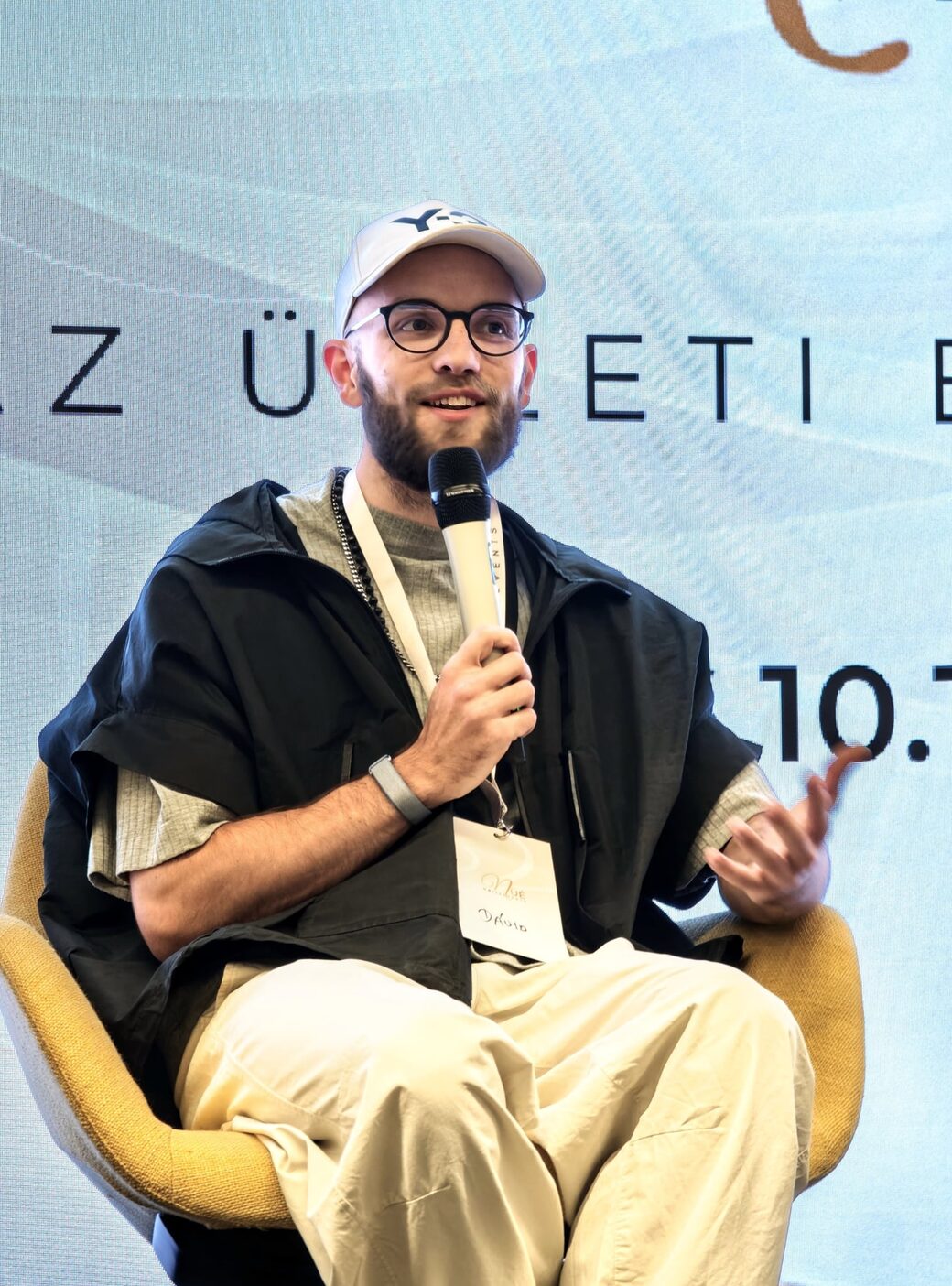
Dave Talas speaking on stage

You direct. Claude executes.

The new way of working with AI. One simple system that onboards Claude to your business. It knows your projects, follows your processes, works in your apps and learns with you as you go. And it gets better with every new Claude model!

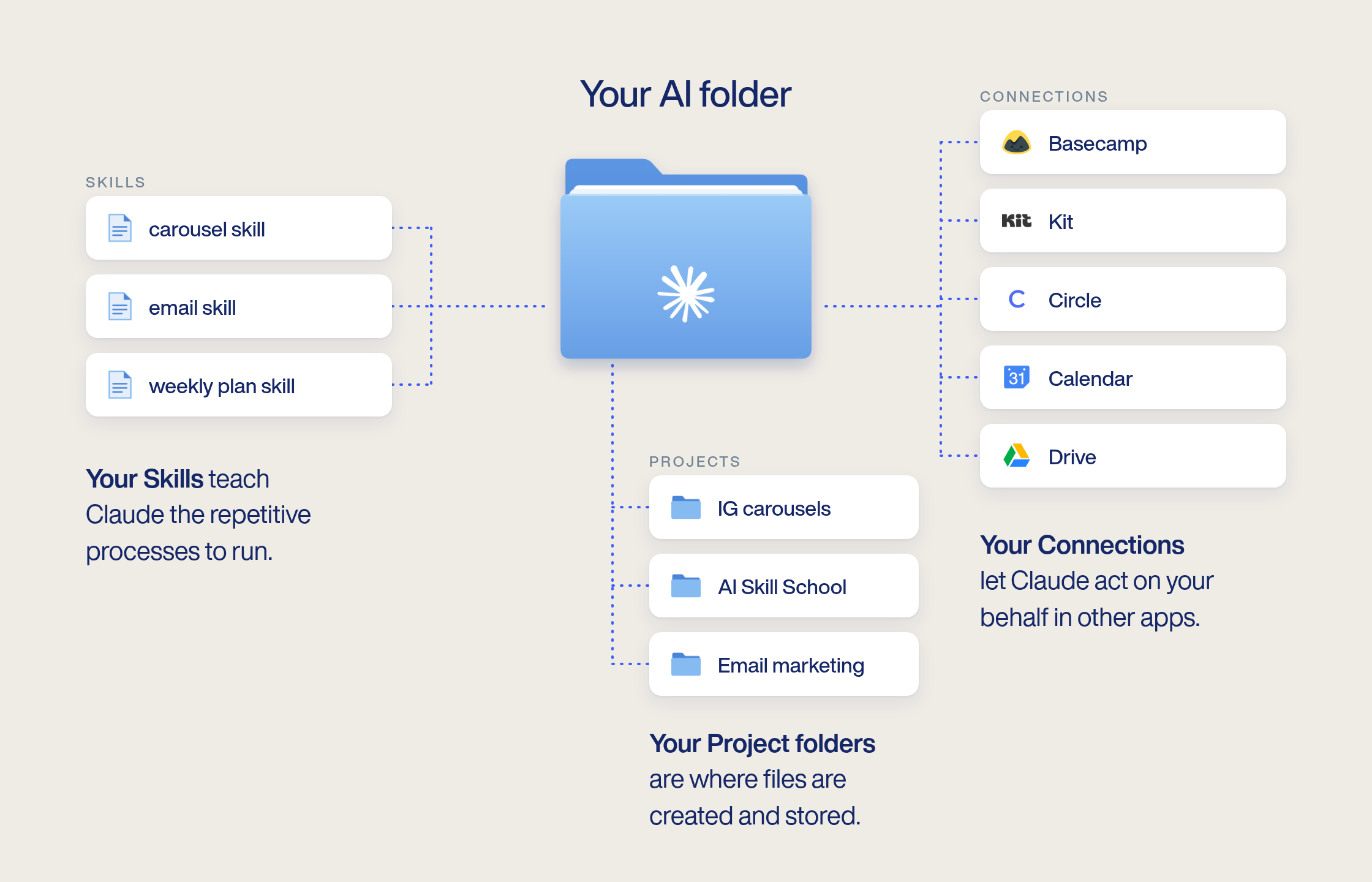
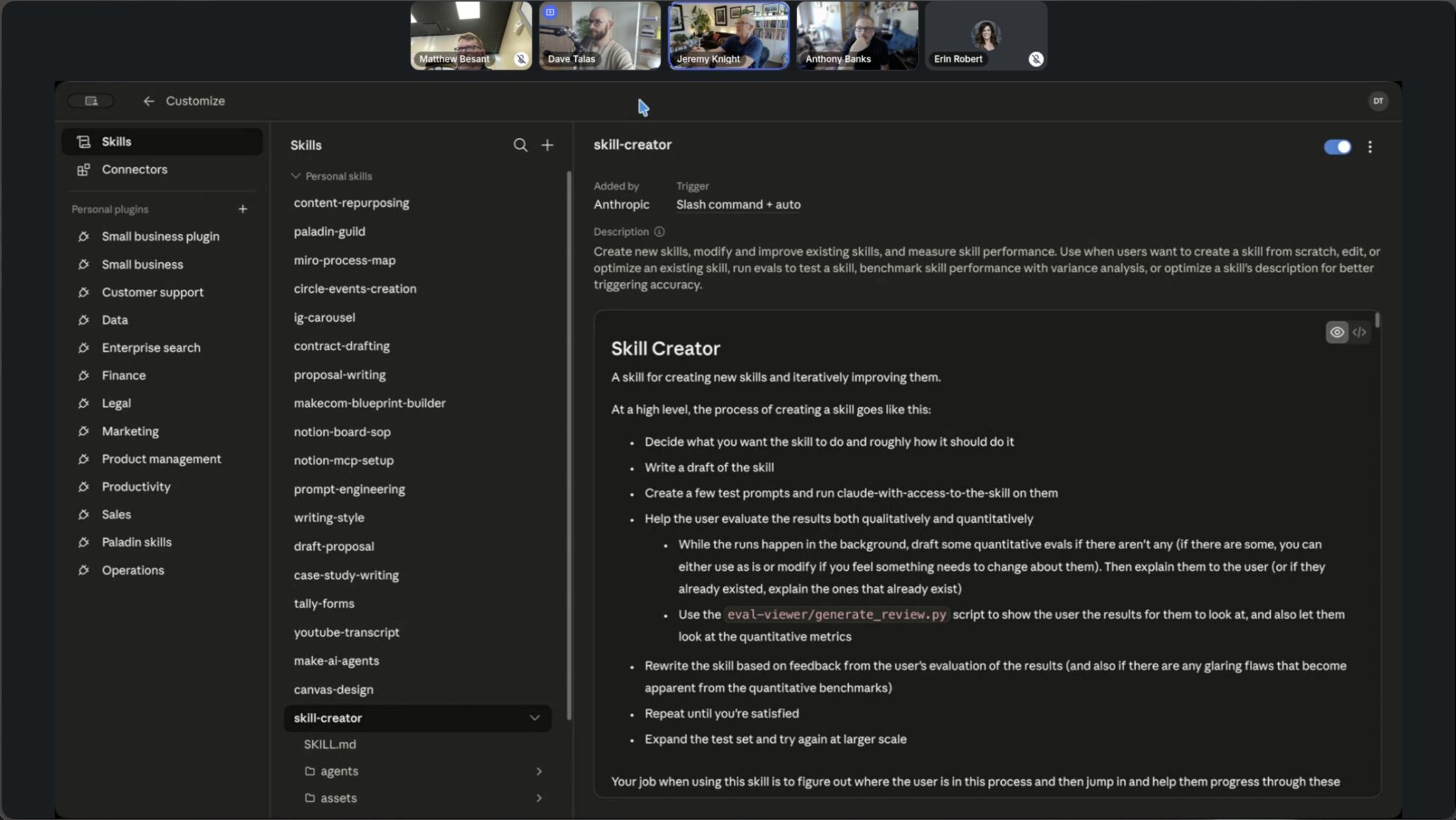
Your AI folder: Skills teach Claude the repetitive processes, Connections let it act in your apps (Basecamp, Kit, Circle, Calendar, Drive), and Project folders are where files are created and stored.

Built on the same simple framework:
Context, Tools, Skills.

Context

What Claude knows

You, your business, your projects and clients. Written once, used in every chat.

Tools

Where Claude works

Your email, calendar, Drive, Slack and other apps, with the permissions you choose.

Skills

How the work gets done

Your processes, written down once, so Claude does them the same way every time.

Build my AI operating system →
Join 40+ other founders

Lessons you can finish in 3 minutes

152 short, practical lessons across 6 courses, a total of around 6 hours. Some are videos, some are text lessons. Each one shows when it was made, last updated and last verified, so you know it’s still current.

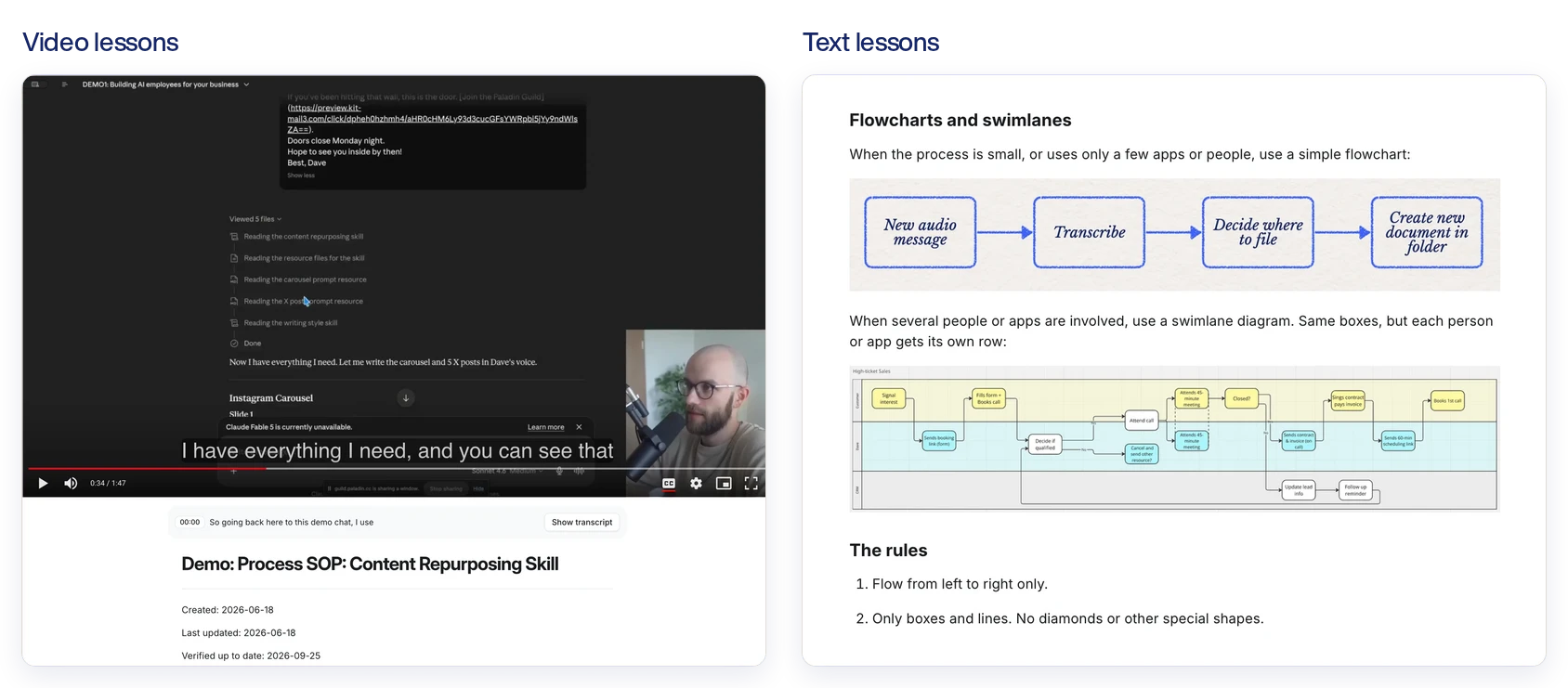
Two AI Skill School lessons side by side: a short video lesson where Dave demos a content repurposing Skill in Claude, and a text lesson on flowcharts and swimlanes with diagrams and rules.

Your AI operating system, on your computer

A folder that tells Claude who you are, what you’re working on and how you like things done. Start any chat from it, and Claude already knows you.

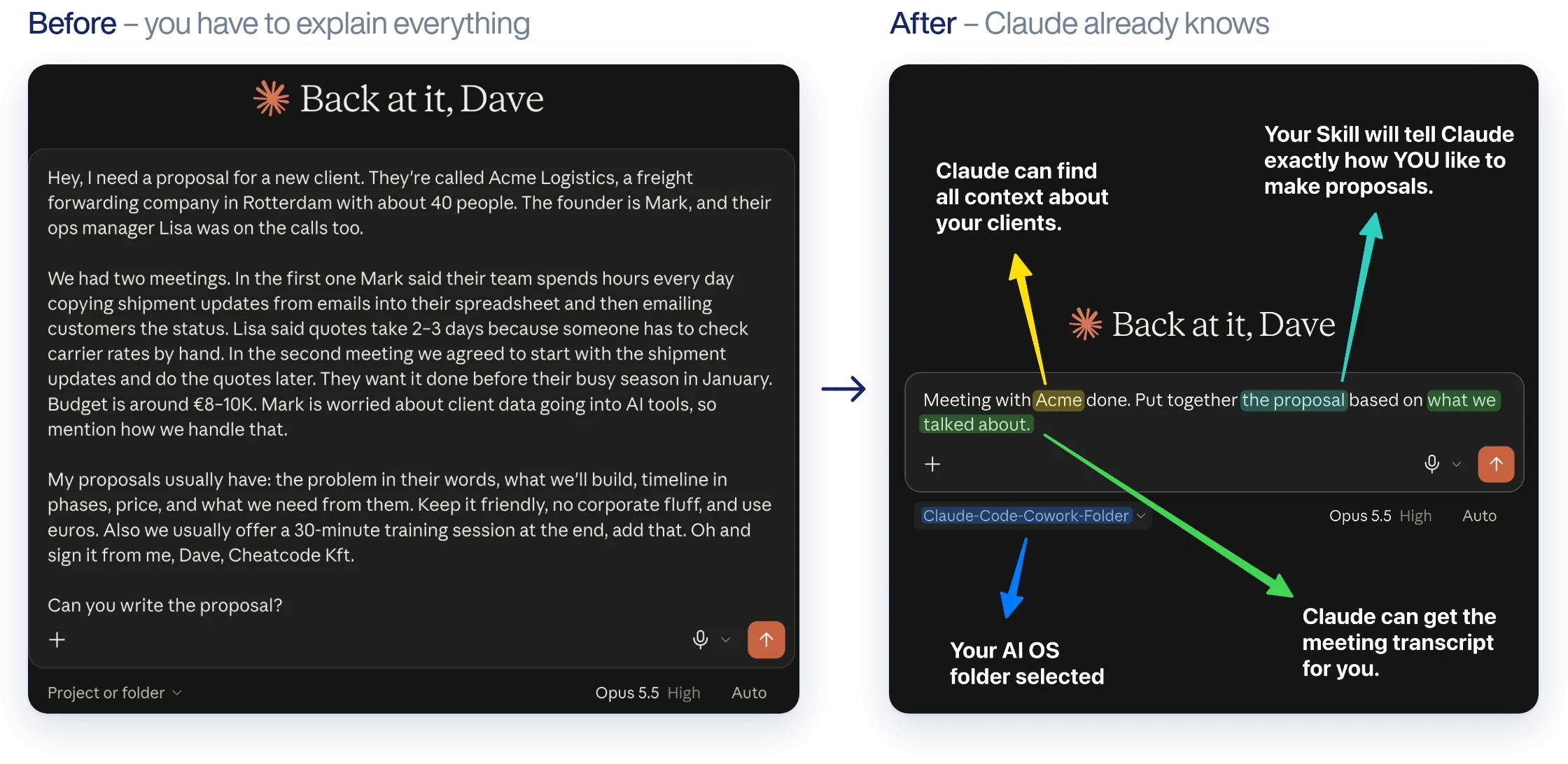
Before: a long message re-explaining the client, the meetings and how Dave writes proposals. After: one line, with the AI operating system folder selected, and Claude finds the client context, the meeting transcript and the proposal Skill itself.

Live sessions every week

One week I show you how I use Claude for real work. The next week I help you with your own Skills and systems. (Founders and VIP Founders)

A weekly live session: Dave walks members through a Claude Skill

Claude, onboarded to your business

I show how I use Claude to publish finished lessons from Basecamp to Circle, and save around 2 hours of mundane manual work.

152lessons
~3 minaverage lesson
~6 hin total

Three paths to the same place

Me, a controller with a growing team, and an agency owner. Different starting points, same result: Claude doing real work, safely.

Start your path
Join 40+ other founders

What’s inside

Everything inside AI Skill School

Show what’s included in:
01Courses

AI Bootcamp: 6 courses, 152 lessons

About 6 hours in total, in 3-minute lessons. Updated as AI changes.
Last updated: 22 October 2026

  • 1.AI basics, Claude and prompting
  • 2.Claude Skills for beginners
  • 3.Safe AI use for companies
  • 4.Connect Claude to apps safely
  • 5.Claude as a coworker
  • 6.Advanced Claude Skills
02Setup

Your AI operating system

A simple system that grows with you and gets better the more you use it. Set it up yourself in about an hour. VIP Founders: we set it up with you on Zoom.

  • •Main instructions file about you and your business
  • •A folder per project or client
  • •Your growing Skills
  • •Connections to your apps
03Strategy

AI Roadmap + 90-minute strategy call

Draft your roadmap, then we refine it together, 1:1. VIP Founders only.

  • •Which work Claude takes over first
  • •What stays with you
  • •How to roll it out to your team
04Plugin

Dave Talas Skills & Plugins

Turns Claude into an AI consultant for your business.

  • •Finds AI opportunities and use cases
  • •Maps your workflows
  • •Builds Skills that run them
05Live

Weekly live sessions + Q&A

One week I show how I use Claude, the next I help with your systems.

  • •Alternating times for EU, US and Asia
  • •Recordings of the best demos
  • •Public deep dive 1:1 calls, where others watch and learn
06Library

Real-world use case library

How I and other members use AI, sorted by work area.

  • •5–10 minute videos
  • •Grows every week
07Community

AI Fluent Founders community

Founders using AI in their business, plus forum support.

  • •Ask questions any time
  • •Share what you built

For teams

Have a team, or part of one, that should use AI too?

You can sign them up. Once it works for you, everyone works from the same system, with the same Skills and the same rules.

Train everyone

Short lessons any team member can finish, one licence per person. No technical background needed.

Share your Skills

One company plugin. Build a Skill once and everyone gets every improvement automatically.

Set the guardrails

Decide what Claude may do alone, what needs approval, and what it never touches.

Chris’s message: plugin and skills are working great now, pipeline is cruising.
Sign my team up The price per person drops as you add licences.

What happens after you join

Your first 30 days

  1. Day 0

    You join. The courses unlock right away, and the community too on Founders.

  2. Day 1

    Set up your AI operating system in about an hour, following the setup lessons.

    VIP BONUSMy team sets it up with you on Zoom.
  3. Week 1

    Learn the basics and safe AI use, and draft your AI Roadmap: the first 1–2 processes Claude takes over.

    VIP BONUSWe refine it together on a 90-minute call.
  4. Weeks 2–3

    Connect Claude to your apps with the right permissions, and build your first Skills.

    FOUNDERS BONUSBring your questions to the weekly live sessions.
  5. Day 30

    Claude is doing your first real tasks, and you know how to bring your team along when you’re ready.

    FOUNDERS BONUSGet use case inspiration, ongoing support and build with other founders.

Is this for you?

This is for you if:

  • ✓You’re a founder, solopreneur or employee who wants AI doing real work for you
  • ✓You want one simple system that works well
  • ✓You want to do it right and safely, and stay calm about AI
  • ✓Once it works for you, you’ll want to bring it to your team or your manager
  • ✓You’re willing to put in a few focused hours and show up

This won’t work for you if:

  • ✕You want hacks, shortcuts and a new AI tool every week
  • ✕You collect 2,000-prompt libraries and never use them
  • ✕You want to move fast and break things, with client data
  • ✕You think AI will magically solve everything (AI is an amplifier: a mess becomes a bigger mess)
  • ✕You don’t do your work on a computer

It doesn’t matter if you’ve never used AI, which AI you use, how technical you are, or what industry you’re in.

Pricing

Join AI Skill School

Pick a plan. Cancel any time, easily.

Courses only

$300/year per person

For
person · $300/year
  • ✓Access to all courses
  • ✓Supporting Skills & resources
  • ✓For you, and anyone you add later
  • ✓Cancel anytime
Enroll myself

VIP Founders

$5,000/year

Everything in Founders, plus:

  • ✓90-minute 1:1 AI Strategy call with Dave every quarter
  • ✓Personalized AI Roadmap review
  • ✓Done-for-you setup support
Join as a VIP Founder

Cancel anytime, easily, on every plan · 30-day money-back guarantee, for any reason

Need help picking a plan? Choose a card that's true for you!

I’m learning it for myself, at my own pace.

Click to flip
Choose:Click to flip back

I want weekly live help, Q&A and other founders to learn with.

Click to flip
Choose:Click to flip back

I want it set up for me, plus a personal AI strategy with Dave.

Click to flip
Choose:Click to flip back

I’m buying for my team.

Click to flip
Choose:Click to flip back

I work at a company and want my team to have this.

Click to flip
Do this:Send this page to your manager →Click to flip back

Guarantee

30-day money-back guarantee

Join, look around, try the lessons. If it’s not for you, tell me within 30 days, for any reason, and you get a full refund. No forms, no hoops, just an email.

Frequently asked questions

“I don’t use Claude.”

You should! :) But if it's not for you, my system and lessons work with ChatGPT, Codex, Cursor or any AI tool that works with files. I demonstrate everything in Claude and recommend it to everyone because it has the best Skills system right now.

Which Claude plan do I need?

Claude Pro (about $20 a month) is enough. You pay it to Anthropic directly. If you use other tools, you need a plan that allows working with files from a folder like ChatGPT Work.

Does it work on Windows?

Yes. Everything works on Mac and Windows.

“I’m not technical.”

You don’t need to be. If you can send emails, edit spreadsheets and learn new software, you have everything you need. And if you get stuck, we help.

When are the live sessions?

Weekly, at alternating times: mostly EU afternoons and US mornings, sometimes EU mornings for Asia. The best demos become short videos in the use case library.

“AI changes too fast. It’ll be outdated.”

I update the lessons when new features come out, and every lesson shows when I last checked it. This is why it's a membership and not a one-time payment. Your system gets better with every new Claude model. Think of it as a car chassis, and Claude is the engine that gets upgraded every few months, and the user guide with it.

“I don’t want to learn AI, I just want to use it.”

You don’t have to become an AI expert. But just like you learned a bit about cars to drive one, you’ll learn a bit about AI to use it well and safely. You won’t become a mechanic.

Can I enroll my team?

Yes. Pick Courses only, set how many people you’re buying for, and the price per person drops. For bigger teams (150+ people), email me at dave@paladin.cc.

Your move

Stop doing the work yourself.
Start directing it, safely.

Learn one simple system, set it up with the right guardrails, and bring your team along when you’re ready.

Join AI Skill School
Join 40+ other founders

30-day money-back guarantee · Cancel any time · Questions? dave@paladin.cc